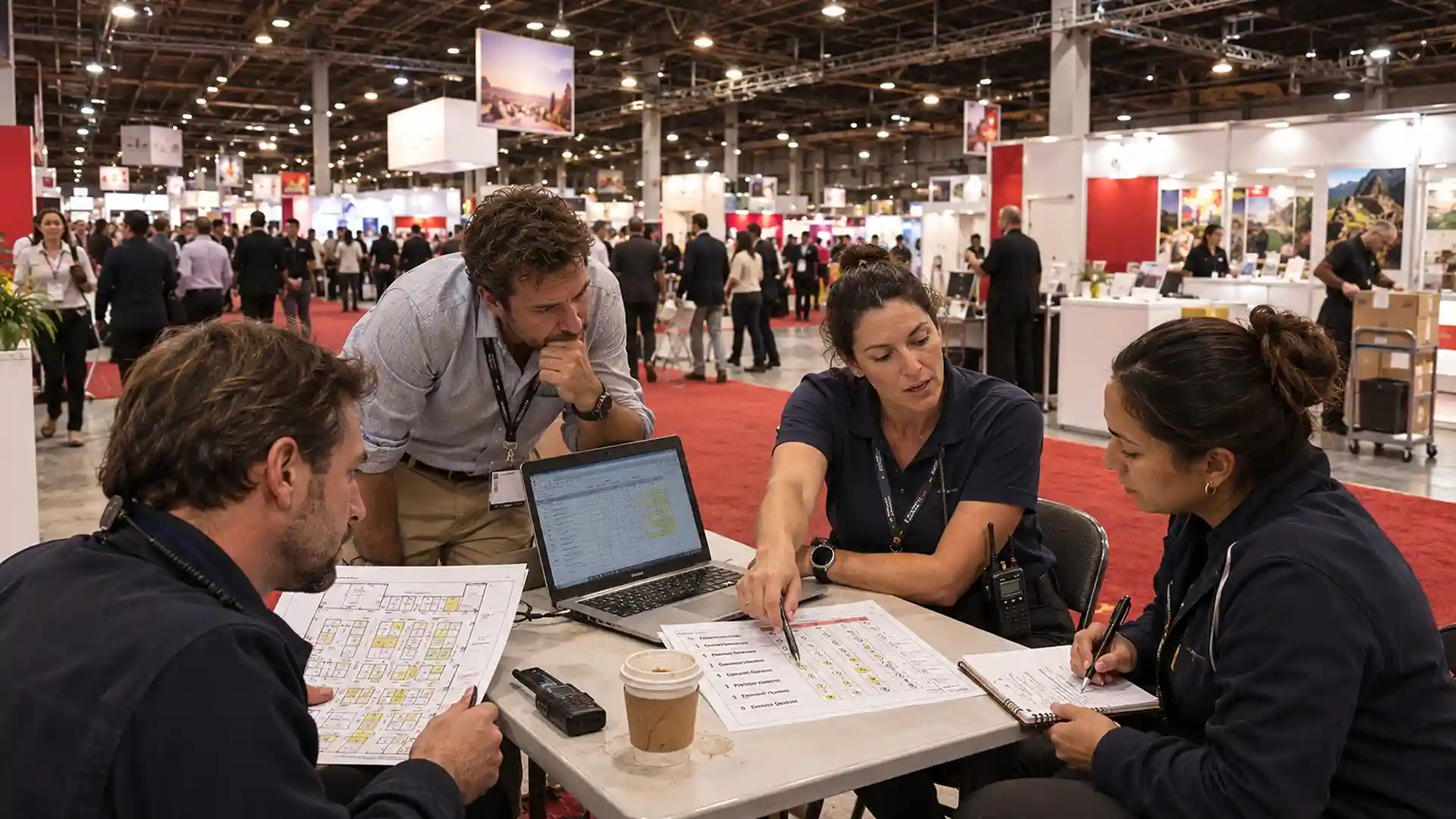

An event debrief template for a large event should cover six blocks: overview and goals, headcount by role, shift hours and overtime, guest flow, an incident log and action items, backed by an 8-point staffing scorecard. Fill it in within 72 hours, while your leads still remember which door backed up and why.
That staffing block deserves more space than most templates give it. In Cvent's 2026 planner sourcing report, 95% of planners said they use on-site event support vendors, and 42% said staffing shortages at venues show up as inexperienced staff. Below you'll find a filled-in example, the scorecard table and a one-week timeline for your post event debrief.
Quick Summary for Your Event Debrief Template
- Build your event debrief template around real numbers like headcount by role, no-shows, check-in waits and shift hours, so staffing gets reviewed from records.
- Score your staffing partner on an event staffing scorecard with eight things you can count, and check overtime by city, since Las Vegas and Chicago trigger it differently.
- Hold the post event debrief within 72 hours and send a filled post event report template within a week, with one owner and one due date on every fix.
What to Include in an Event Debrief Template for Large Events
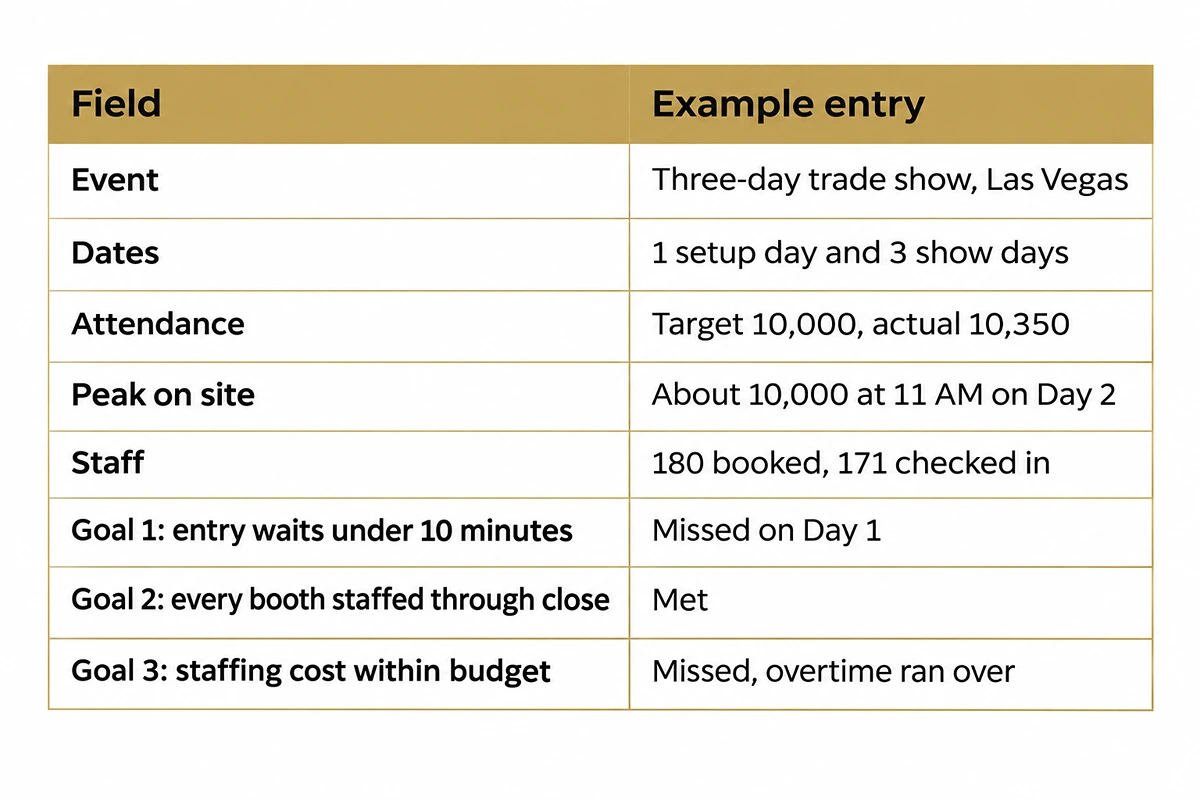
The easiest way to see a good event debrief template is filled in. Every block below uses an example three-day trade show in Las Vegas with one setup day and a peak of about 10,000 people on site. Every count, time and result is an example entry.
1. Event Overview and Goals
Start with the facts everyone agrees on.
2. Headcount by Role and Staff-to-Guest Ratio
This is where most debriefs go vague, so count it role by role.
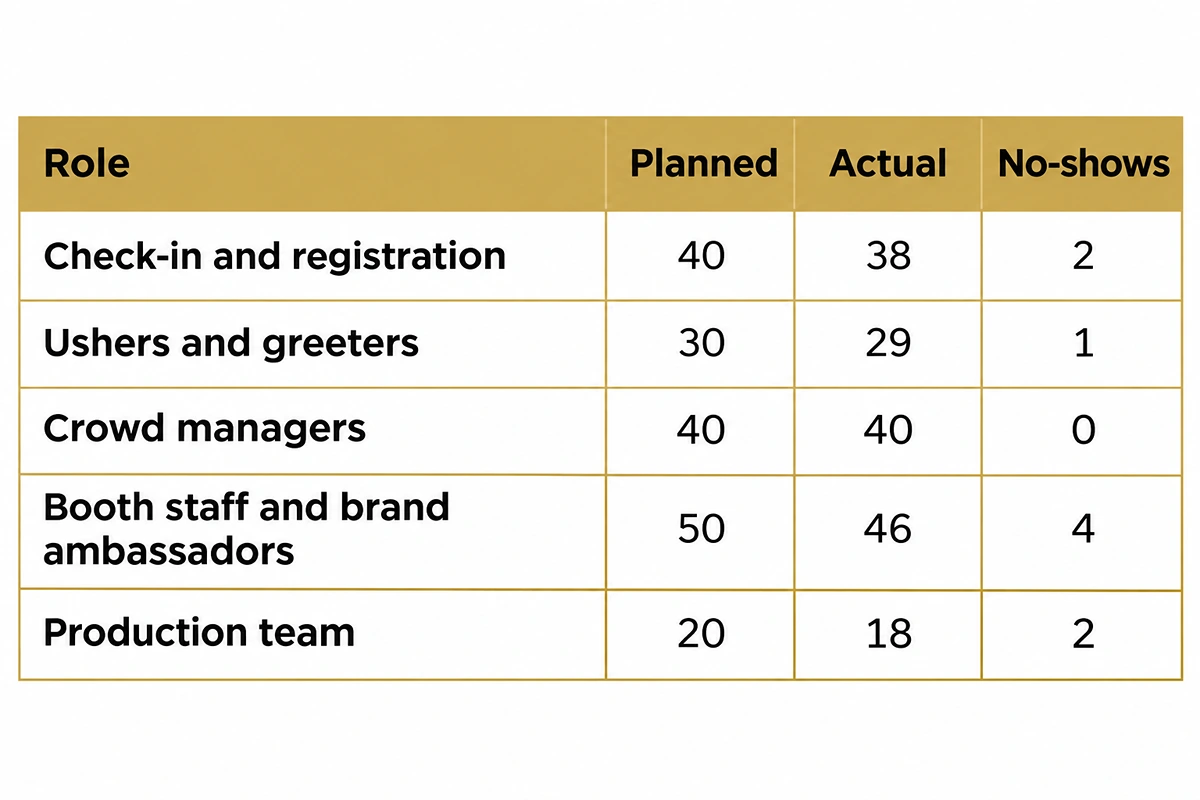
Now check each role's ratio against what you planned:
- Registration: compare your desk count to the conference staffing mix, a common planning baseline, and note where the queue said you needed more.
- Crowd managers: NFPA 101 calls for one trained crowd manager per 250 occupants, so a 10,000-person peak needs about 40. That's roughly 8 at a 2,000-person peak and 100 at 25,000. The ratio counts peak occupancy, and your local fire marshal decides which code edition applies.
- No-shows: there's no reliable industry rate to compare against, so record your own count and how long each gap took to cover.
3. Shift Hours and Overtime by City
Track scheduled hours, actual hours per person per day and per week, overtime hours and cost against budget. City rules change the math fast:
- Las Vegas: Nevada pays 1.5x after 8 hours in any 24 for workers earning under $18.00 an hour, per the state's daily overtime bulletin effective July 1, 2026. A 10-hour show day puts 2 overtime hours on every worker under that line, so 40 check-in staff add 80 overtime hours daily.
- Chicago: Illinois only pays 1.5x after 40 hours in a workweek. A 10-hour setup day plus three 10-hour show days lands at exactly 40, so one extra strike shift tips that person over. It depends on how the employer defines its workweek.
Each person's actual pay rate decides whether they cross the line, so ask your agency to show overtime as its own line. Planning a repeat show? Compare Las Vegas staffing and Chicago staffing before you book.
4. Guest Flow and Check-In Wait Times
Break the busiest morning into 30-minute blocks.
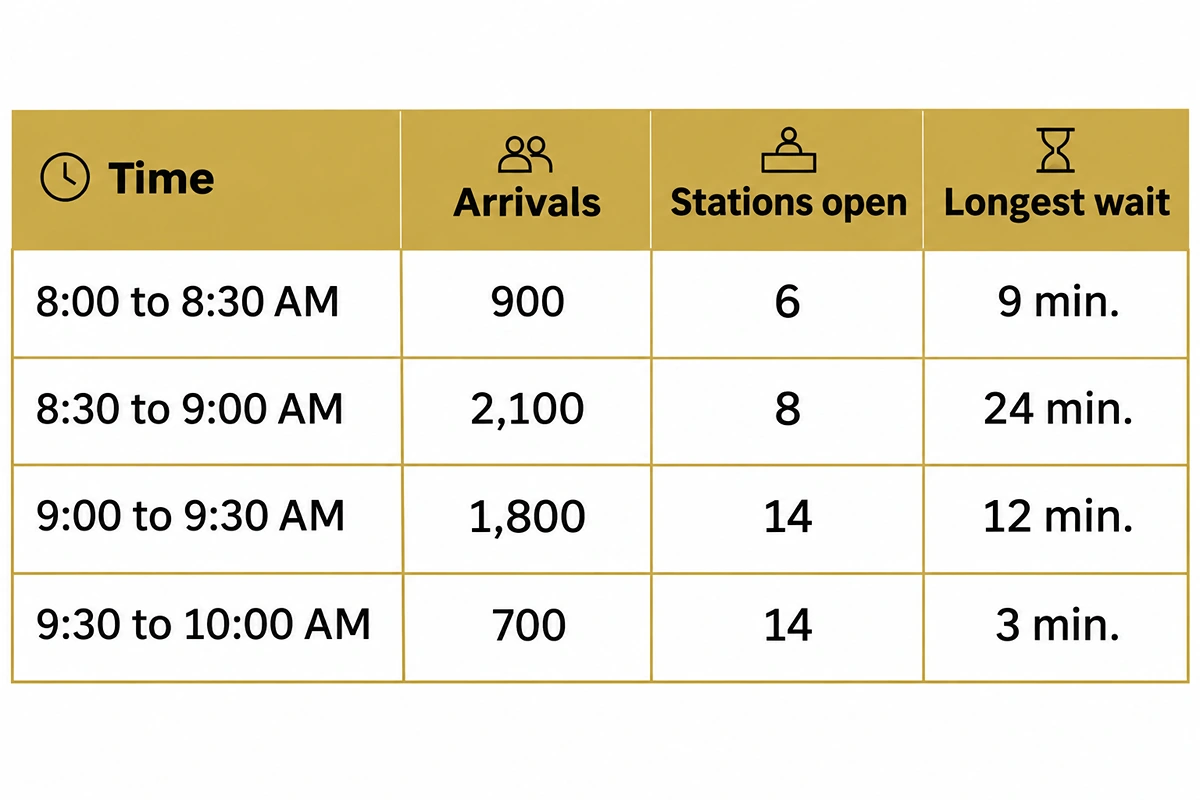
All 14 stations opened half an hour after the arrival peak. The fix goes straight into the next plan: move check-in call times earlier so every station is open before 8:30.
5. Incident Log
Pull the radio log and supervisor notes into one time-stamped list, and tag each cause:
- 8:41 AM, north entrance: badge printer jam, fixed in 14 minutes. Cause: process.
- 12:20 PM, Hall C lunch line: aisle blocked, 2 ushers moved from the west lobby. Cause: staffing gap.
- 4:55 PM, loading dock: strike crew arrived 30 minutes late. Cause: call time.
6. Action Items for the Next Event
Every finding above becomes an action with one named owner and a date.
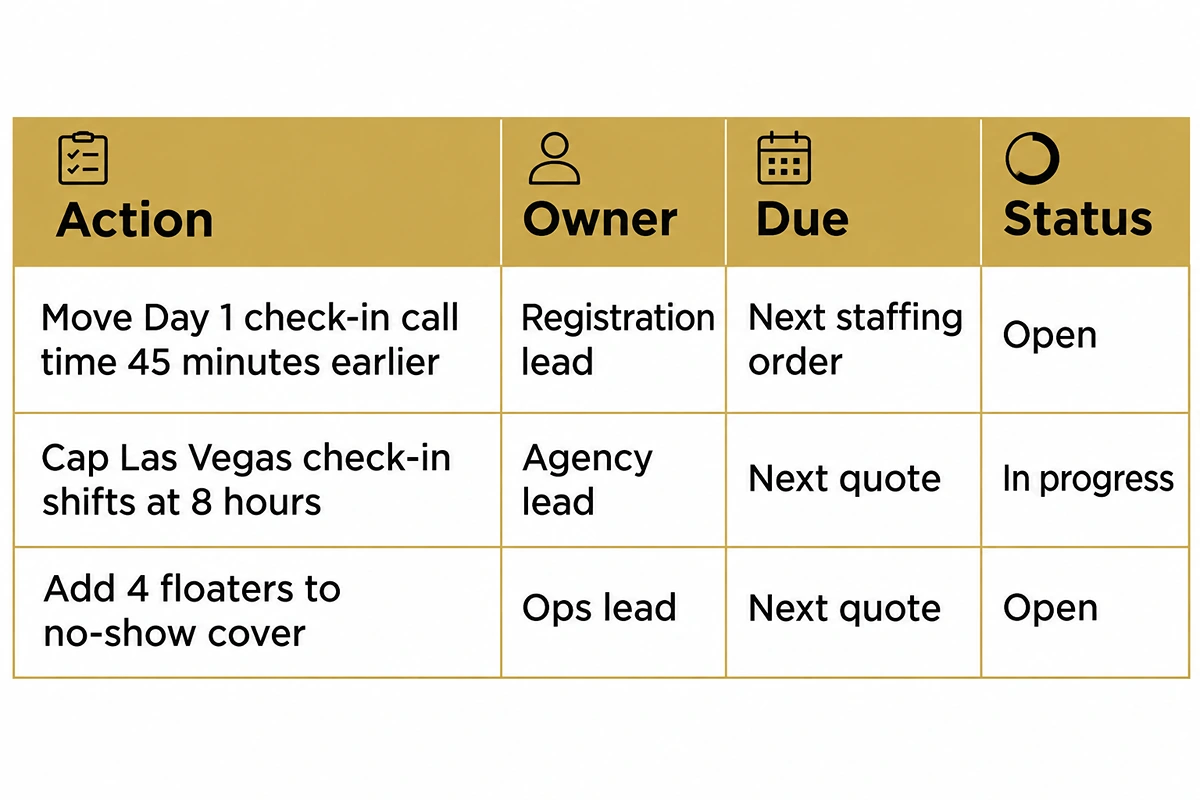
Carry these straight into your next event staffing plan, so the next headcount starts from real numbers.
CEO Excerpt
"The scorecard is the page of a debrief I read first. If you can show me how many people were on post at each door when the doors opened, we can fix almost anything for the next event. Score us the same way every time and hold us to it." -- Daniel Meursing, CEO, EventStaff
How to Build the Staffing Scorecard in Your Event Debrief Template
The event staffing scorecard is the part of your post-event evaluation that turns floor impressions into numbers you can compare from one event to the next. Use eight scores, measure each from your records and rate them 1 to 5 so your staffing partner knows exactly where they stand.
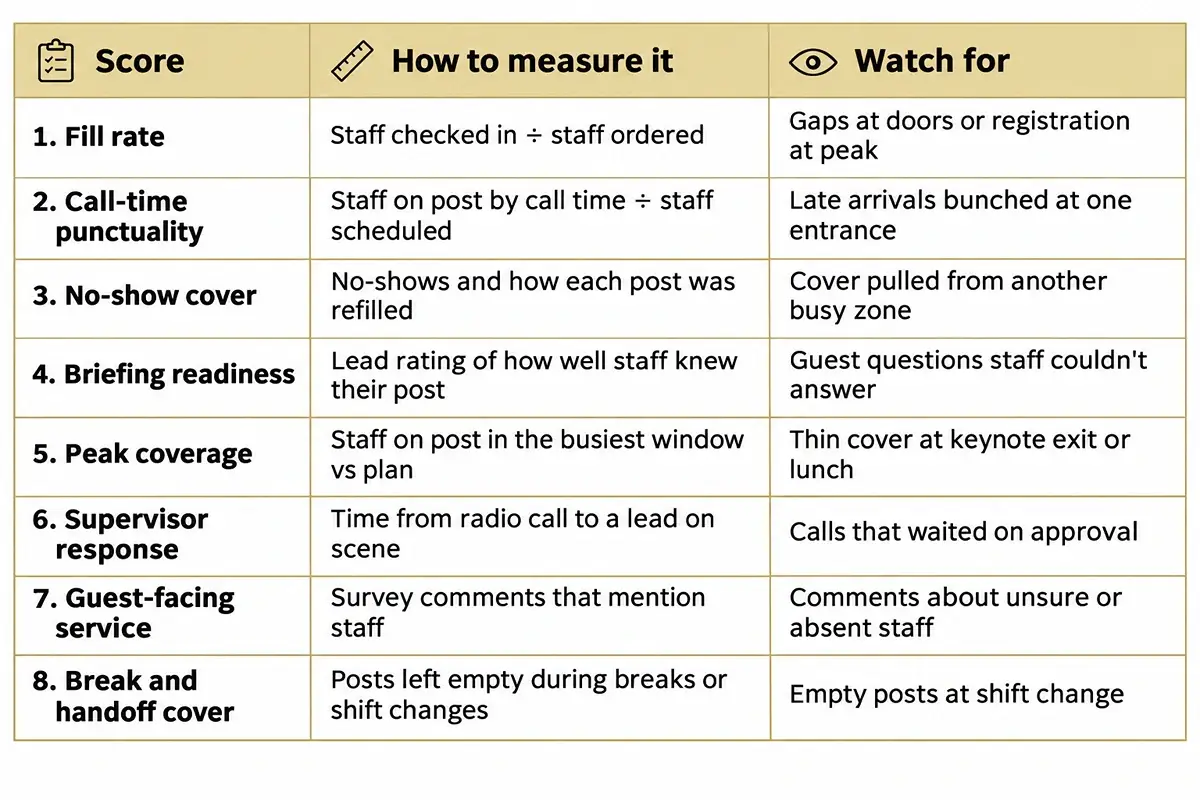
Rate Each Zone as Well as the Whole Team
A team-wide 4 can hide a 2 at the north entrance. Score your busiest zones on their own lines, so you know exactly where to add people or change posts for the next event.
Keep Vendor Scores Apart From Individual Feedback
The scorecard rates the staffing partner's system as a whole. Send notes about specific people to the agency privately, so the room stays focused on coverage, process and leadership on the floor.
Compare Your Scores From Event to Event
Fewer events means each one has to teach you more. Northstar's 2026 forecast found just 23% of planners expect to run more meetings in 2026 than 2025, so keep every event staffing scorecard on file.
Event Debrief Questions to Ask Each Group in the Room
The numbers show what happened, and the people who worked the show explain why. Ask each group these event debrief questions in the meeting or in a survey the next morning.
Questions for Floor Staff
- Was your briefing clear about your post, your lead and your break time?
- Where did lines build up, and at what time?
- What did guests ask that you couldn't answer?
- Did your breaks leave your post empty?
- Did your radio, scanner or badge printer work all day? Your answers shape the next staff briefing.
Questions for Supervisors and Vendors
- Did call times match when the crowd actually arrived?
- How were no-show gaps covered, and how long did each take?
- Where did shift handoffs leave posts thin?
- Did load-in and strike run on the times you were given?
- Where did communication between teams slow a decision down?
Questions for the Client Team
- Did staff look, sound and act like your brand?
- How were VIPs and key guests handled at arrival?
- Which moments went better than you expected?
- What would you change first at the next show?
- Which complaint reached you first?
When to Run a Post-Event Debrief for a Large Event
Timing decides how much your post-event debrief can fix. Details fade once the crew goes home, and the agency invoice can arrive before anyone checks it.
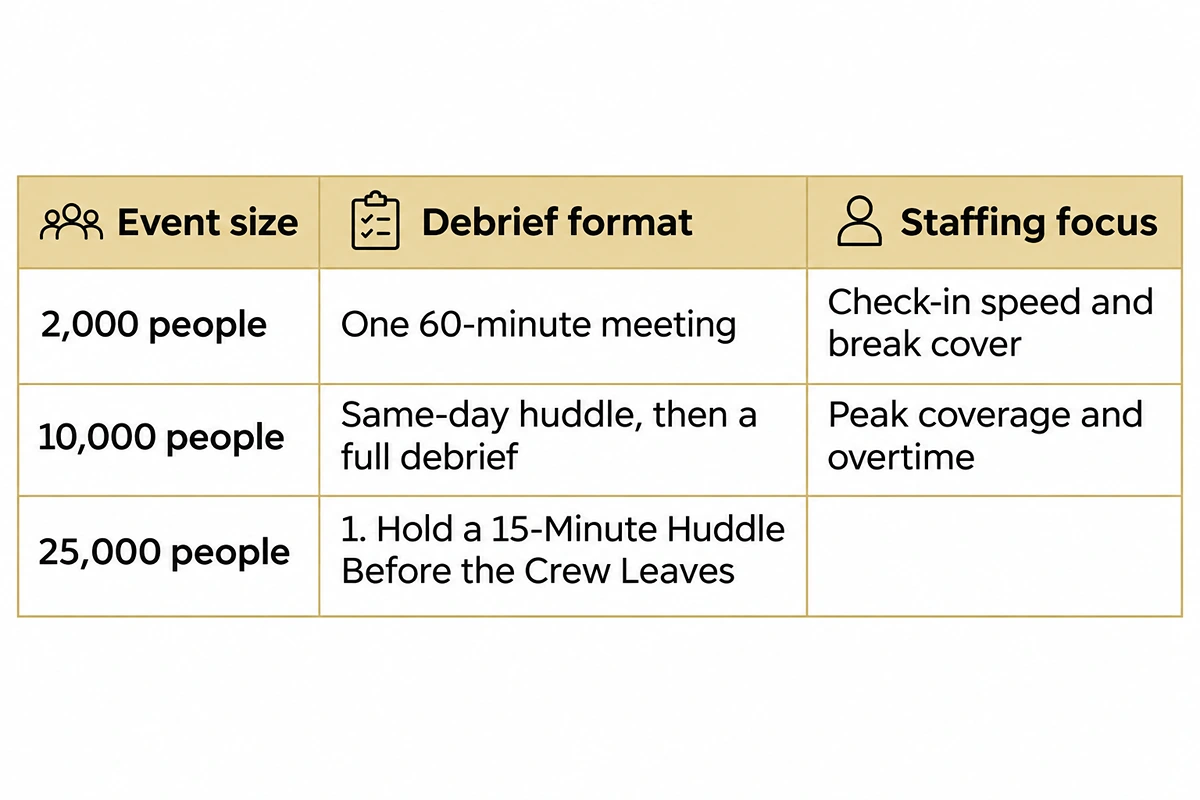
25,000 people
### 1. Hold a 15-Minute Huddle Before the Crew Leaves
Grab your supervisors at strike while the radio log is fresh, and log their answers to three event debrief questions:
- What broke, and at what time?
- What fixed it, and who made the call?
- Which post would you staff differently tomorrow?
Check Hours Against the Invoice Within 48 Hours
Before anyone meets, line up three sets of records side by side:
- Scheduled hours against timesheets by role, to flag unplanned overtime.
- Timesheets against the agency invoice, so you only approve hours worked.
- Hourly scan counts against staff on post, to see when you ran short.
Run the Debrief Meeting in a Fixed Order Within 72 Hours
Book 60 to 90 minutes with your leads and walk the run of show in this order: goals, guest experience, staffing, vendors, then budget. A fixed order stops the loudest complaint taking over. Within a week, send a post event report template with the scorecard first.
the scorecard, then the three biggest fixes and the person who owns each one.
Use Your Event Debrief Template Before the Next Event Gets Booked
A filled-in event debrief template only pays off when it shapes the next order. Bring the headcount, check-in waits and overtime hours to your first planning call and ask how those gaps get covered next time. Run the same post event evaluation after every event and file it with your post event report template.
Debrief Template Is Different From an Event Recap Template
An event recap template is usually outward facing. It shares highlights, attendance and photos with sponsors, leadership or attendees. An event debrief template is internal and more candid. It records what went wrong, why it happened and who's fixing it, including staffing gaps and overtime. Many teams build the recap from the debrief once the actions are set. Both work for stadium event staffing and trade shows alike.
Staff Your Next Large Event With a Team That Wants to Be Scored
If your last event debrief template showed thin cover, slow replacements or surprise overtime, bring it to us and we'll plan your crew around those gaps. Start with trade expo staff in your city and send us your scores.

Ready to elevate your next event?
Join thousands of event planners who trust EventStaff.com for reliable, professional staffing solutions.
Trusted by event professionals nationwide
1k+
Events Staffed
2 million+
Guests Served
97%
Positive reviews