

The Event Staffing Plan Template You Can Actually Fill In
You have a rough staff number, an empty spreadsheet, and too many moving parts. This event staffing plan template turns that loose headcount into zones, shifts, ratios, reporting lines, backup cover, costs, and confirmations, so your supplier, venue, finance team, and onsite lead can work from the same document.
Executive Summary
This event staffing plan template gives you a fillable structure for turning a headcount into a working event plan. You will map the event profile, role matrix, shift pattern, ratio basis, reporting lines, backup cover, cost estimate, and confirmation tracker. The goal is a printable plan that shows who works where, when, why, and under whose lead.
Your Staff Count Is Not the Plan Yet
“We need 20 staff” sounds useful until the venue asks who arrives at load-in, who covers registration, who moves between rooms, who stays for teardown, and who answers when a post goes empty. A headcount is only the number of people visible at one moment. An event staffing plan turns that number into a working document.
Use this first block to separate the loose number from the actual plan:
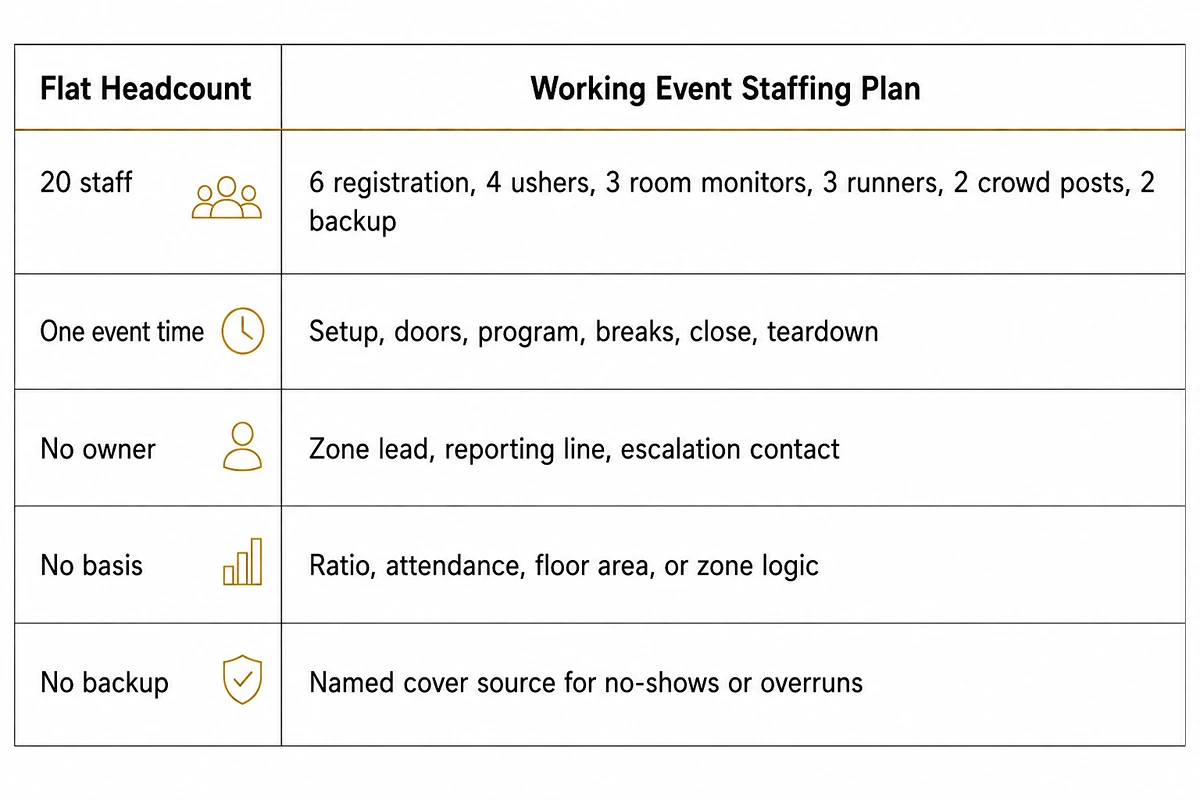
Smartsheet’s event templates are a useful competitor reference because their staffing template includes fields like role, name, department, shift date, start and end times, supervisor, and notes. That is a solid admin shell, but it still does not solve the event-specific problem: staff work zones, peaks, and handoffs, not just names in rows. (smartsheet.com)
For a stronger template, the first decision is simple: write down what the number must do. Setup staff may finish before doors open. Registration may peak in the first hour. Teardown may require different people than the guest-facing shift. The brief’s point is worth keeping close: the pillar can explain the method, but this article should stay as the artifact the reader fills in.
For deeper planning logic, link the reader to EventStaff’s staffing plan pillar, then bring them back to the template.
Start With the Details That Change Every Staff Number
The event profile is the part people skip because it feels obvious. It is also the part that explains every number later. A 700-person seated all-hands, a 700-person trade show reception, and a 700-person multi-room conference do not produce the same staffing plan. Same attendance, different floor pressure.
Fill this block before adding roles:
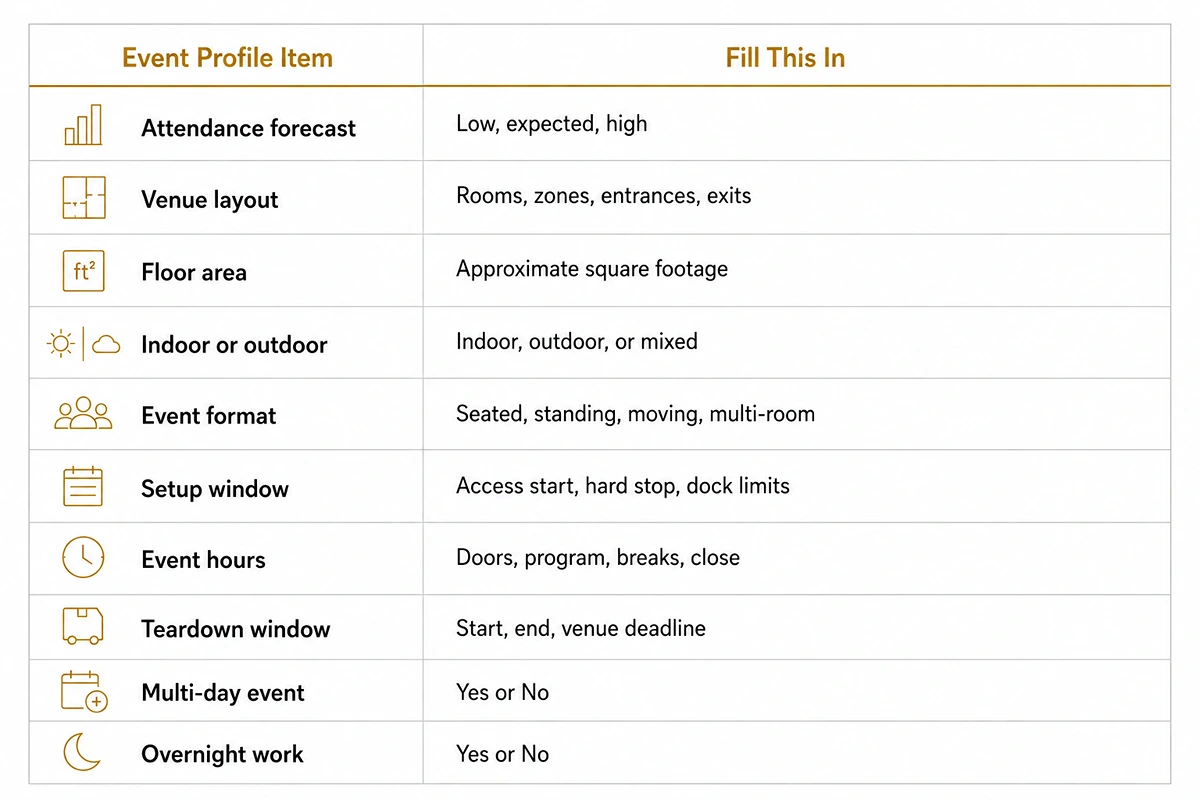
The Bureau of Labor Statistics describes meeting, convention, and event planners as arranging many parts of events and professional gatherings, and it projects 5% employment growth from 2024 to 2034 for the role. That outside context matters here because staffing is only one piece of a larger operating plan, but the profile is where those pieces become usable inputs.
A practical example: if the venue has two public entrances, one freight route, four breakout rooms, and a two-hour setup window, the staffing plan should show that before anyone adds job titles. Registration, runners, ushers, room monitors, and crowd staff all depend on those profile details.
For EventStaff, this is the handoff point for corporate events: the completed profile tells the team what kind of crew map the event actually needs.
Yes, you’re right. For a downloadable event staffing plan template, the tables should not look empty or unfinished. I’ll use sample-filled rows plus wording like “replace with your event’s details,” so the reader sees how to complete the block without getting a blank spreadsheet.
I’ll also avoid the uploaded AI-style phrases, especially “this is where,” “that’s why,” “not just X but Y,” “in today’s,” “plays a crucial role,” “seamless,” “elevate,” “streamline,” “maximize,” and “take it to the next level.” Your file specifically says each paragraph should explain a staffing decision, show a concrete event example, or move the reader closer to understanding what staff they need.
Put Staff Where the Pressure Actually Happens
A role list can look organized and still miss the floor problem. “Six ushers, four runners, eight registration staff” does not show where people stand, what pressure point they cover, or which zone gets thin during a break. A better staffing plan for events starts with zones, then assigns roles inside each one.
Use this sample-filled role matrix as the starting block. Replace the values with your event’s rooms, attendance, and supplier names.
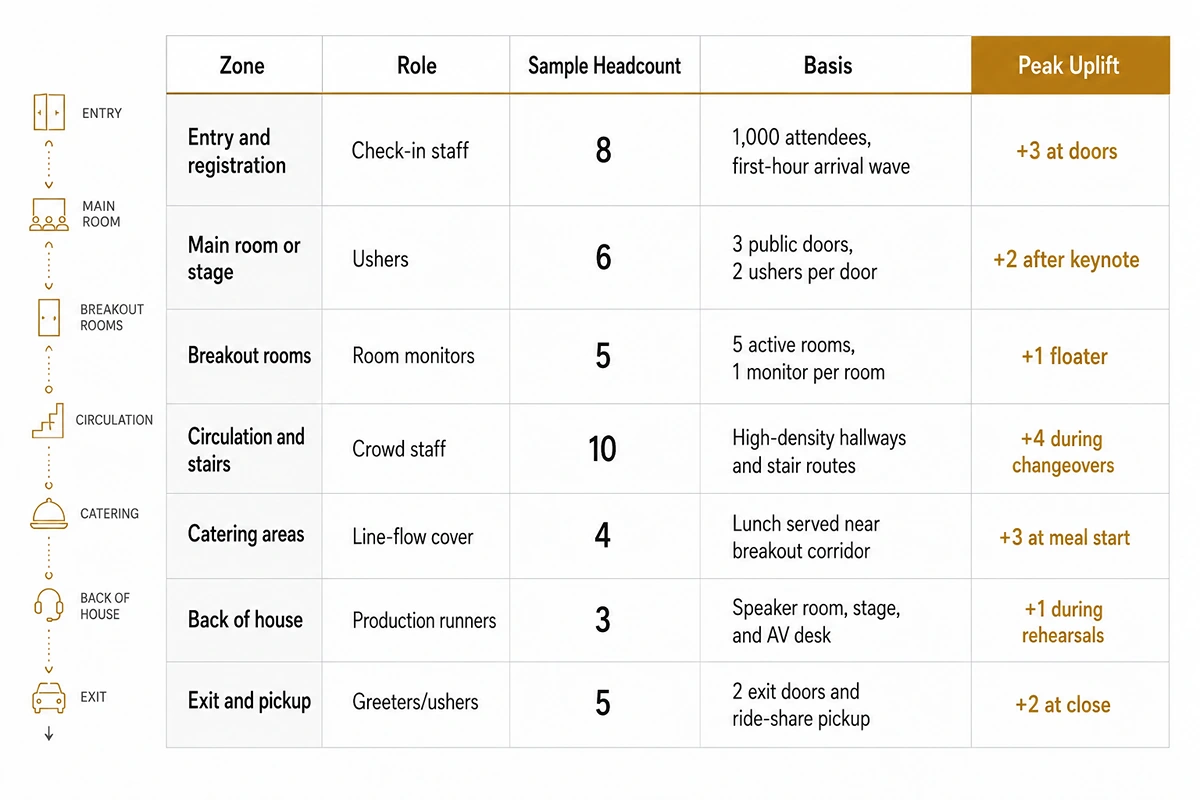
Cvent’s floor plan guidance is a useful outside reference here because it tells planners to map entrances, exits, registration desks, restrooms, and food stations before thinking through attendee movement. It also warns that registration near the entrance can become a bottleneck if it blocks doors. That is the exact planning habit this role matrix should copy: start with the place where pressure forms, then add the role.
The Basis column is the part most templates miss. If a row says “10 crowd staff” with no basis, the number becomes hard to defend when attendance changes. If it says “high-density hallways and stair routes,” the planner knows which zone to revisit when the room count, agenda, or floor plan changes. The brief also says every ratio should be treated as a planning range, not an EventStaff commitment.
For EventStaff, this is the first point where the template becomes a real crew map. Registration staff, greeters, ushers, room monitors, runners, booth staff, brand ambassadors, and crowd-management posts all sit in visible zones instead of floating inside one generic staff count. Link the deeper reasoning to the EventStaff staffing plan pillar and keep this article focused on the fillable block.
CEO Excerpt
Plan event staffing with confidence using a practical, fillable template. Map roles, shifts, staffing ratios, peak periods, backup coverage, costs, and reporting lines in one place. - Daniel Muersing
A Full-Day Event Cannot Run on One Flat Shift
A flat headcount usually breaks at the edges of the day. The event may need 20 people while guests are inside, but load-in, doors, breaks, close, and teardown rarely need the same mix. A working event staffing plan gives each phase its own shift line, even when some staff work across more than one phase.
Use this sample shift block to show the supplier what the day actually requires.
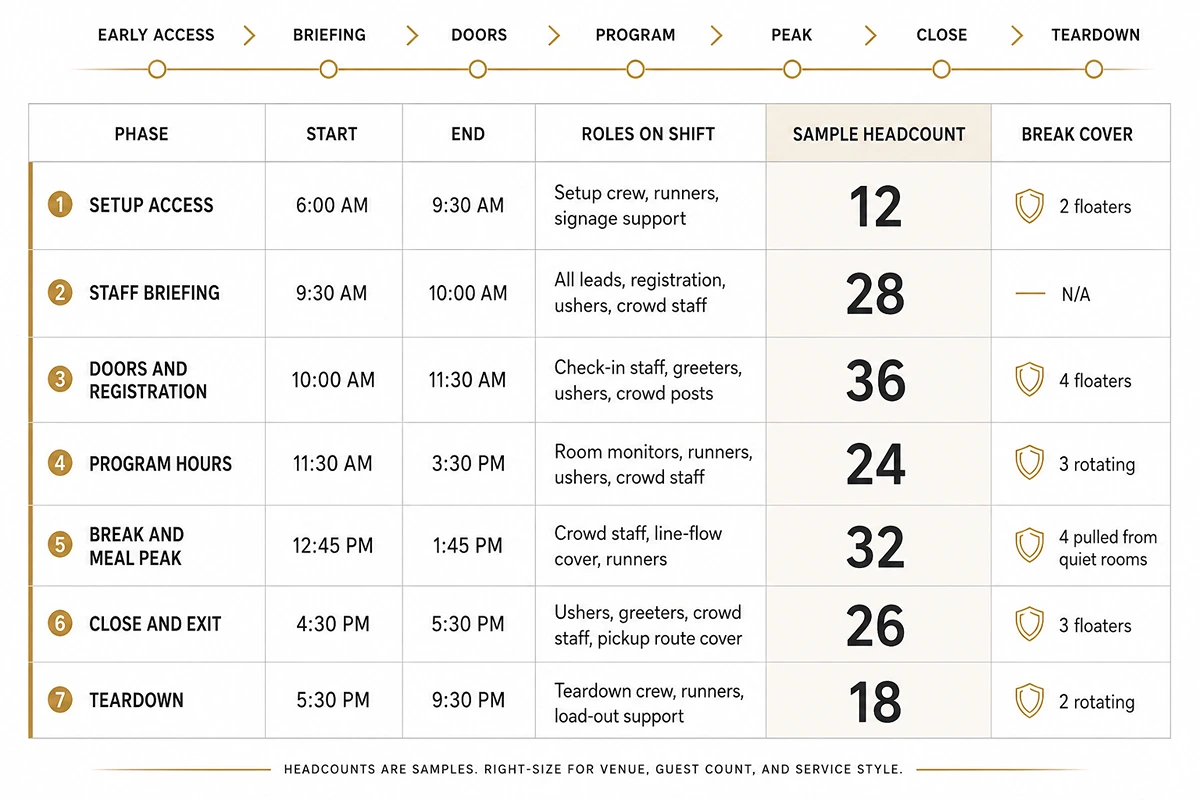
The brief gives two useful planning rules here: load-in is typically allowed at 4+ hours minimum, and setup crew is often planned around floor area rather than attendee count. It also says setup, event, and teardown should get their own lines because a concurrent headcount is not the same thing as a full-day rota.
EventStaff’s setup and teardown staff guide gives a practical example of why setup and teardown should be treated separately from guest-facing hours. Its setup planning is tied to build size and load complexity rather than guest count alone.
The useful decision is the trade-off. Longer shifts reduce the number of separate bookings, but teardown can suffer if the same team has been on its feet since morning. Shorter shifts add handoffs, but they protect the close, load-out, and final venue walkthrough. Put those choices in the shift block before the supplier prices the crew.
Got it. No more table-after-table structure. For these two sections, use different visual formats: one can be a “peak map” checklist, the next can be a “basis note” block with examples and fill-in lines. I’ll also avoid the AI-style phrasing from your uploaded guardrail, especially repetitive “this is where,” “that’s why,” “not just X but Y,” and generic claims.
Your Busiest 45 Minutes Need Their Own Staff Plan
A same-number-all-day rota looks tidy, but the event will not move that way. Registration gets crowded before doors. Breaks push people into hallways, restrooms, elevators, coffee lines, sponsor areas, and breakout rooms at the same time. Close brings another short surge at exits, coat check, pickup points, and ride-share zones.
Accelevents’ badging playbook gives a practical check for the first pressure point: walk the attendee path, time a small arrival sequence, and keep the help lane clear. That belongs directly inside the event staffing plan template because the help lane may only need extra people for 45 minutes, not the whole day.
Use a peak map instead of another flat staffing row:
Mark the pressure windows
- Doors and registration: extra check-in staff, badge issue desk, greeters, and line direction.
- Keynote exit: ushers near main doors, crowd staff near restrooms and hallway bends.
- Breakout changeover: room monitors, stair/elevator cover, floaters between corridors.
- Meal release: line-flow staff near catering, seating, trash points, and blocked walkways.
- Close: exit doors, coat check, ride-share point, lost items, and late guest questions.
Write the move inside the plan
- “At 8:00 AM, move 3 setup floaters to badge issue.”
- “At 10:15 AM, move 2 sponsor-zone staff to keynote exits.”
- “At 12:30 PM, release 4 room monitors to lunch-flow cover.”
- “At 4:45 PM, move breakout ushers to coat check and exit doors.”
The brief’s logic is simple: demand rises and drops through the day, so the required number changes by window. Crowd-management ranges also tighten as density rises, and a single-session event will not have the same peaks as a multi-track conference. These are planning ranges, not rules.
For EventStaff, the useful handoff is not only the headcount. It is the move plan: who shifts, where they go, and when they return. Teams checking crowd assumptions can pair this block with EventStaff’s crowd staffing resource, while this template keeps the peak windows visible on the page.
Write Down Why Each Staff Number Exists
A number without a basis becomes hard to defend. “12 crowd staff” may be correct, but finance cannot check it, the supplier cannot adjust it, and the event lead cannot update it when attendance moves from 900 to 1,200. The event staffing plan template should record the reason beside every number.
Use a short basis note under each staff line:
Crowd staff: 12 posts
Basis: 900 guests, dense reception layout, planned from 1 per 50–75 guests. Increase if the lobby or catering area narrows.
Setup crew: 22 people
Basis: 6,000 sq ft build, planned from 1 per 250–300 sq ft, with overhead work added.
Registration: 14 staff
Basis: 1,200 expected attendees, first-hour arrival wave, separate issue desk and VIP lane.
George Washington University’s crowd rules show why written basis matters. Their page summarizes code-based crowd-manager requirements using occupant load thresholds. That is a different context from event staffing, but the planning lesson is the same: a staffing number should point back to the condition that produced it.
Use these basis prompts in the plan:
For attendance-based roles
- What guest count produced the number?
- Is the event seated, standing, or moving?
- Does density tighten during any window?
- Which zone creates the highest pressure?
For space-based roles
- What floor area or build size produced the number?
- Does setup include overhead work?
- How much load-in time does the venue allow?
- Does teardown happen after a long guest-facing shift?
The brief gives the ratio guardrail: use language like “common planning baseline” or “industry planning range,” never wording that makes the ratio sound like an EventStaff guarantee.
Once the basis is written down, the plan can be rerun instead of debated. If the guest count rises, update the attendance-based rows. If the floor plan grows, update the setup rows. If the crowd pressure shifts to a different zone, update the role map. EventStaff’s corporate events team can then review a plan that shows the thinking behind the crew number, not only the final total.
Name Who Moves People When the Floor Changes
A staffing plan can name every role and still stall during the first live problem. A badge printer jams. A keynote room opens late. A sponsor asks for extra queue cover. A runner disappears into the loading dock. If staff do not know who can move people, small issues wait too long for a decision.
Use this as a reporting-line checklist inside the plan:
- Name one lead for each zone, not only one lead for the full event.
- Give every lead a direct escalation contact.
- Write down the radio channel, group chat, or phone chain before staff arrive.
- Mark which roles can move between zones and which must stay fixed.
- Keep one backup source visible for no-shows, overruns, or sudden crowd pressure.
- Add the briefing owner, because unclear briefings turn into repeated questions on the floor.
A practical instance: Bizzabo’s event check-in guidance recommends assigning onsite staff to specific positions and mapping the arrival journey before the doors open. Their event check-in advice is aimed at registration, but the same thinking applies across the whole staffing plan. If the badge desk lead, entrance lead, and floor lead all report to different people with no escalation path, the entrance slows while everyone waits for permission to move staff.
Write the reporting line in plain language:
Registration lead: reports to event operations manager.
Radio: Channel 2.
Backup source: two floaters from lobby direction after 9:30 AM.
Escalation: onsite EventStaff lead if wait time passes five minutes.
The brief calls this section out for a reason: a plan with no named backup source assumes nobody drops out. It also says reporting lines and cover should sit in the template before the EventStaff connection, because these details decide how fast anything gets fixed onsite.
“The plan people skip is the reporting line.
On event day, the first question is who can move staff when the floor changes.
A name, channel, and backup source can save twenty minutes of confusion.”
For EventStaff, this is the difference between a crew list and a working floor plan. The finished template should show who is staffed, who leads them, and who can reassign cover when the event stops following the spreadsheet.
Give Finance Enough Detail to Price the Crew
A cost block does not need to publish universal rates. It needs enough detail for finance and suppliers to quote the same event. If the plan says “registration staff, 10 people,” finance still has to ask how many hours, which shifts, what role type, and whether backup cover is included.
Use a cost-note format under each role instead of another grid:
Registration staff
10 people, 6 paid hours each, first-hour peak cover included. Rate basis: supplier quote. Cost owner: marketing operations.
Crowd staff
14 people, 7 paid hours each, with 4 staff released after lunch. Rate basis: supplier quote. Cost owner: event operations.
Setup crew
12 people, 4 paid hours each before staff briefing. Rate basis: supplier quote. Cost owner: production lead.
Backup cover
3 people held across doors, lunch, and close. Rate basis: supplier quote or minimum call. Cost owner: event operations.
The Bureau of Labor Statistics notes that meeting, convention, and event planners arrange many parts of events and projects, with 5% employment growth from 2024 to 2034 for that occupation. Its planner profile is planning-side context, not a staffing-rate source, but it is a useful reminder that event budgets touch many moving parts before any crew quote is approved.
For the template, write the cost basis beside the role:
- Hours: paid hours, not only event hours.
- Shift: setup, doors, program, close, teardown, or full day.
- Role type: registration, crowd staff, runner, usher, greeter, brand ambassador.
- Rate basis: supplier quote, venue requirement, union/vendor rule, or internal budget.
- Cost owner: the person who can approve the number.
- Open question: anything the supplier must price before confirmation.
EventStaff’s corporate events page belongs naturally after this block because the reader has moved from planning rows into real crew numbers. The plan should give EventStaff enough detail to quote roles, hours, peaks, and backup cover without rebuilding the event from scratch.
Lock the Details That Usually Get Lost in Email
A staffing plan can look finished while the riskiest items are still floating around in email. Final headcount approved, but nobody confirmed the call time. Registration staff booked, but the badge system login sits with one person. Load-in access agreed, but the dock contact changed the night before.
Use the tracker as a short sign-off block, not 35
another spreadsheet-heavy section.
Confirmation items to lock before the plan goes to the supplier
- Final staff count approved by the budget owner.
- Role list confirmed by zone lead, not only by the event lead.
- Call times attached to each role.
- Venue entrance, loading dock, and credential rules written into the plan.
- Uniform, badge, or wristband instructions confirmed.
- Staff briefing owner named.
- Backup source named for no-shows, overruns, and last-minute scope changes.
- Supplier confirmation date recorded.
Guidebook’s event planning checklist includes day-of logistics, registration, AV, staff coordination, vendor confirmation, and onsite setup as separate planning areas. That is the reason this final tracker belongs inside the event staffing plan template. Staff confirmations touch more than one team. If the venue changes the loading route, registration and production may both feel it.
Use a simple tracker note like this inside the plan:
Registration staff confirmed: 14 staff, 7:00 AM call time, north lobby entrance.
Owner: Event operations lead.
Open item: Final badge login list due Thursday at 3:00 PM.
Crowd staff confirmed: 12 staff, 8:15 AM call time, west hall entrance.
Owner: Floor manager.
Open item: Final radio channel list due after venue walkthrough.
The brief says blank rows matter because the reader is completing a working document, but the article should give enough guidance to fill the block quickly. A sample-filled confirmation tracker does that better than a blank table. It shows the reader the level of detail the supplier needs without turning the section into another planning lecture.
For EventStaff, the finished tracker gives the corporate events team the details that decide whether the crew arrives ready or spends the first hour chasing missing information.
Send the Plan When It Is Ready to Become Crew
The template should end with a clean handoff. At this point, the reader has the event profile, role matrix, shift blocks, peak windows, ratio basis, reporting lines, backup cover, cost notes, and confirmation items. The remaining question is practical: who can staff the roles written into the plan?
A filled template might read like this:
Event: 1,200-person corporate conference
Highest-pressure windows: doors, lunch release, keynote exit, final pickup
Crew mix: registration staff, greeters, ushers, room monitors, runners, crowd staff
Backup: floaters held across doors and close
Supplier question: can this crew map be covered with the current call times?
Abastio’s day-of coordination checklist tells planners to call or message vendors with specific arrival times, entrance points, and setup areas and to send team members the final timeline with call times highlighted. That is the handoff this template should produce. The supplier should not have to rebuild the event from scattered notes.
Turn Your Staffing Plan Into Crew Coverage
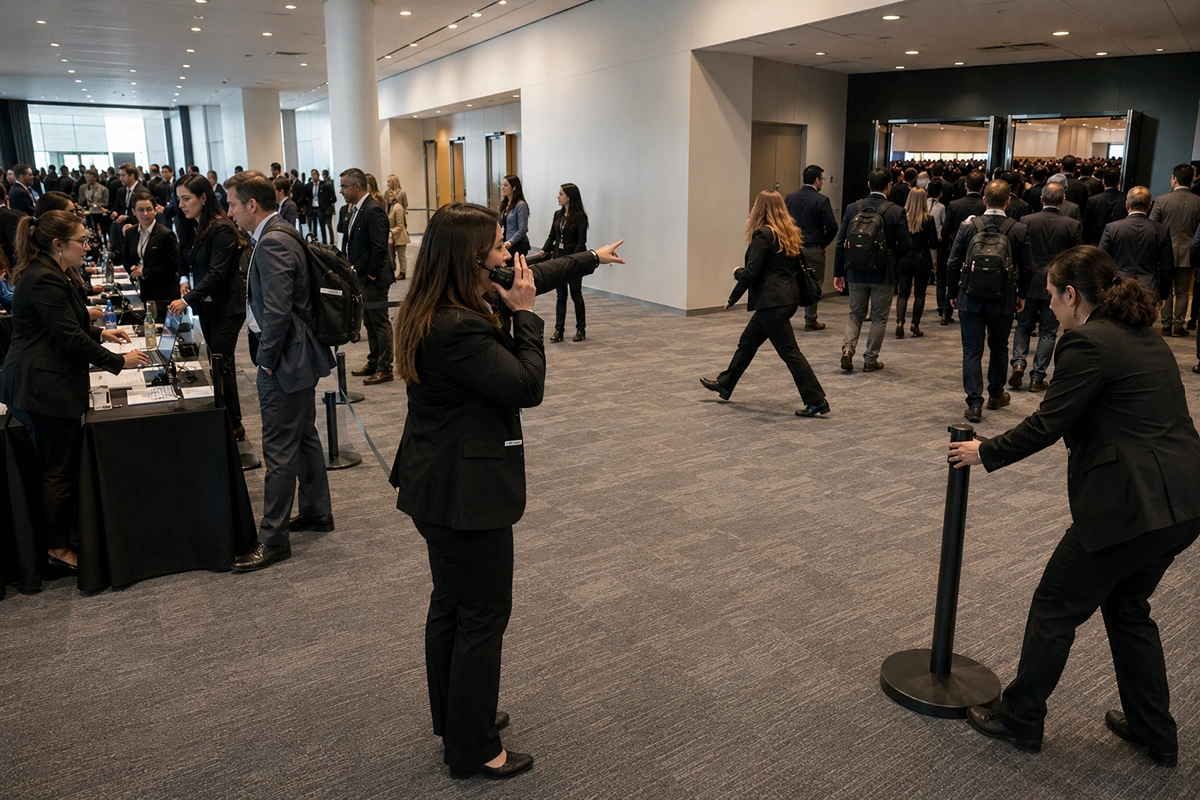
Your completed event staffing plan should give the supplier everything needed to understand the assignment: event profile, zones, roles, call times, peak periods, reporting lines, backup coverage, and open items.
Before sending it out, check that every role has a location, every shift has a call time, every major peak has enough coverage, and someone is responsible for making onsite staffing changes.
Ready to Staff the Event?
Use the completed plan as your starting point for a staffing quote. EventStaff has staffed 500+ events and supported 2M+ attendees, with crews covering registration, guest services, ushers, runners, brand ambassadors, booth staff, and crowd-management roles.
Send your completed staffing plan to EventStaff to discuss crew coverage for your event.
Ready to elevate your next event?
Join thousands of event planners who trust EventStaff.com for reliable, professional staffing solutions.
Trusted by event professionals nationwide
1k+
Events Staffed
2 million+
Guests Served
97%
Positive reviews