
How to Build a Run of Show for Large Events
A run of show is your internal playbook for every moment that happens during a large event, from the second doors open to the moment guests leave. Unlike an attendee-facing schedule, a run of show is built for your team: the event director, stage manager, AV operator, registration staff, and vendor contacts. It's the document that keeps everyone synchronized when things move fast, and the stakes are high. This guide walks you through building one that actually works, preventing the timing failures and staffing breakdowns that plague large conferences, stadium events, and festivals.
Executive Summary
A run of show is the operational backbone of any large event, ensuring every moment from staffing to technical cues runs on time. This guide explains how to build a structured, real-time command document that aligns your entire team and prevents costly delays. By focusing on clear ownership, precise timing, and contingency planning, event teams can execute seamlessly even under pressure. Mastering your run of show is the key to delivering smooth, professional, and disruption-free events.
Why Run of Show Planning Matters for Large Events
Event execution failures rarely come from poor ideas; they come from poor coordination.
- Over 60% of event delays happen during transitions, not main sessions
- AV miscommunication and unclear ownership are among the top causes of live event disruption
- Multi-track events are significantly more likely to run behind schedule without a structured run of show
This is why experienced event teams treat the run of show as a core part of their event production schedule, not just a planning document.
What Makes a Run of Show Different From an Event Schedule?
Guests see your event schedule. Your team lives by the run of show.
An event schedule is what attendees get. It lists session names, speaker titles, and maybe breakout room locations. It's designed for clarity and brevity, typically just the flow of the day from the audience's perspective.
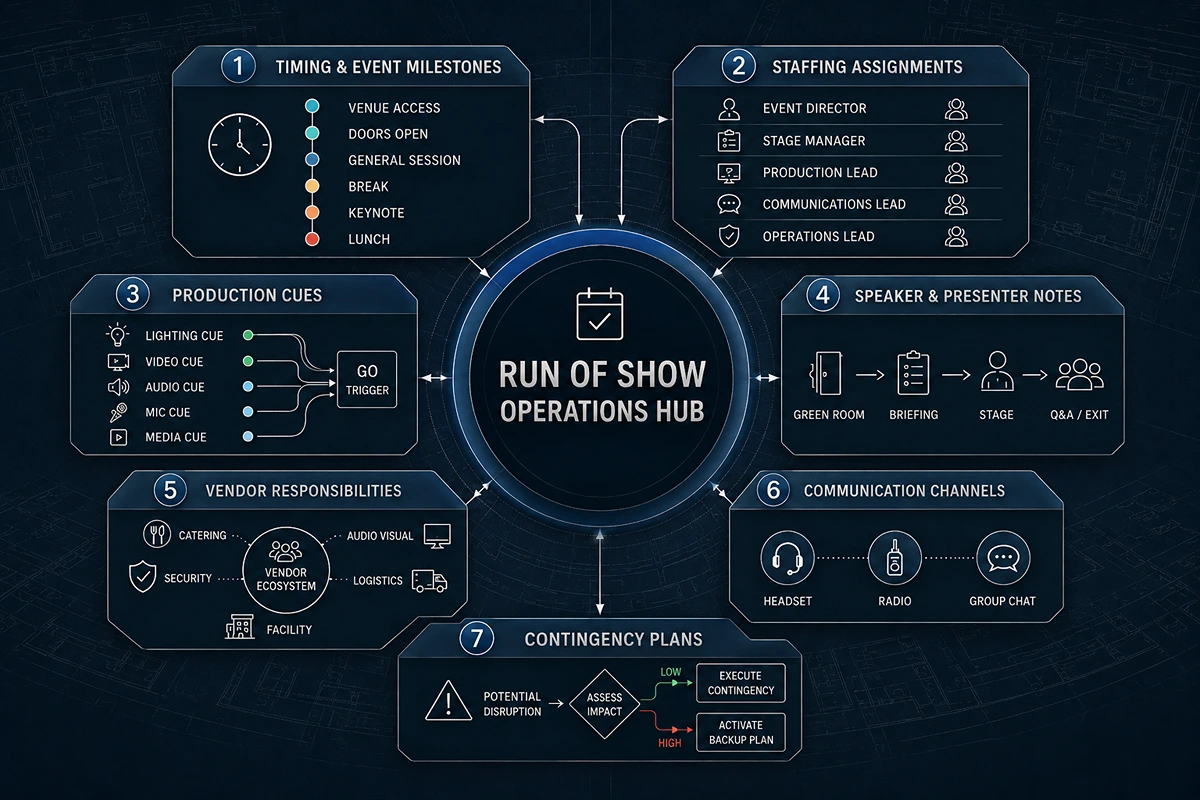
A run of show is the internal operations document. According to the run of show definition, it controls what happens backstage while the schedule plays out onstage. It includes technical cues, staffing assignments, vendor handoffs, communication channels, and contingency plans. It's the difference between a general timeline and a command document.
For a large event, this distinction matters. When you're running a 500-person conference with four breakout sessions, a keynote speaker, AV transitions, and lunch logistics, the schedule tells attendees what's happening. The run of show tells your team how to make it happen without dropped cues, delayed speakers, or registration bottlenecks.
The 7 Core Components Every Run of Show Must Include
A strong run of show has these seven non-negotiable elements:
Timing and Event Milestones. Break your event into 15-minute or 30-minute blocks. Note when doors open, when the keynote starts, when transitions happen, and when breaks end. Assign buffer time to transitions, don't assume a speaker will walk offstage at exactly 10:00 AM. They rarely do.
Staffing Assignments. Name the person responsible for each major event moment. Who manages registration when doors open? Who cues the first speaker? Who coordinates lunch service? Vague ownership is where timing falls apart. When you build an event staffing plan, clarity on roles is just as critical as the run of show itself.
Production Cues. Document every technical moment: lights up, video plays, microphone goes live, screen advances. These cues happen in sequence, and sequence matters. A 30-second delay cascades.
Speaker and Presenter Notes. Include speaker timing, tech requirements, green room details, and what happens after their session ends. Does the next speaker wait offstage, or are they brought in during the applause?
Vendor Responsibilities. If catering, AV, security, or rentals are involved, list what they own and when. No surprises, no gaps.
Communication Channels. Define how the team communicates during the event. Headsets? Walkie-talkies? Slack? Decide in advance. Don't figure it out at 9 AM while doors are opening.
Contingency Plans. What happens if a speaker is 15 minutes late? If AV fails? Is lunch service slow? Write it down. Decide in advance so you're not improvising under pressure.
How to Build a Run of Show for Large Events (Step-by-Step Guide)
Start with your event objectives and work backward. That's the key difference between a run of show that holds together and one that falls apart.
- Step 1: Define Event Objectives. What are the critical moments that must run on time? For a conference, it's usually the keynote and the final session that close. For a stadium event, it's the entertainment start and sponsor activation windows. Identify these anchor points first.
- Step 2: Map Every Major Event Activity. Write down every activity in order: registration opens, welcome remarks, keynote, breakout sessions, lunch, afternoon sessions, closing remarks, and networking. Don't skip the small stuff; include breaks, bathroom time, and transitions.
- Step 3: Assign Ownership. Next to each activity, write the name of the person who owns it. The event director owns the overall flow. The stage manager owns speaker cues. The registration manager owns the check-in speed. Understanding event staff roles makes this assignment clearer and keeps everyone accountable.
- Step 4: Build Timing and Transitions. Now add clock times. Specify not just when an activity starts, but when it ends and how long the transition takes. A speaker transition typically needs five minutes for Q&A, applause, speaker exit, next speaker entry, and mic test. Don't budget three.
- Step 5: Add Technical and Staffing Cues. Go back through and layer in the technical and staffing details. When does the video play? When does the AV test happen? When does catering set up lunch? When do security staff position themselves? This is where the run of show becomes the operational command document.
- Step 6: Stress-Test the Timeline. Walk through it with your team. Read it out loud. Ask, "If we're five minutes behind, what breaks?" Build buffer into those moments.
Fast Takeaway: A run of show should be built backward from critical event moments, not forward from the opening session.

CEO EXCERPT
Most run-of-show failures don't happen because the plan was bad; they happen because teams stop updating it after 7 AM. The document is only valuable if it evolves with the event. Real teams assign one person to own it all day and communicate every deviation in real time. That's the difference between a timeline that holds and one that breaks. - Daniel Muersing
How Event Teams Actually Use a Run of Show on Event Day
A run of show isn't a static document. It's a living command document updated in real time.
The event director watches the clock and communicates deviations to the team. If the keynote speaker runs 10 minutes over, the director updates the run of show and alerts the registration team that lunch will start late.
The stage manager reads the run of show moment by moment, calling cues into the AV operator's headset: "Speaker walks on stage in 30 seconds." "Lights up in 10." "Video plays on my mark." The run of show becomes the script they read from.
The registration manager watches line length and staffing against the timeline. If check-in is backed up, they know when the opening remarks end (from the run of show) and staff accordingly.
The production team coordinates AV, lighting, screens, and sound to the run of show timeline. Everything syncs to those timestamps. For large conferences, especially, the conference staffing mix (registration, ushers, monitors) all depend on the run of show to stay in sync.
Quick Reality: Most run-of-show failures happen because teams stop updating the document after it's created. They print it at 7 AM, then ignore changes all day. Assign someone to update it in real time as the event unfolds.
Real Run of Show Example: Stadium Event vs Conference vs Concert
- Stadium Event. Gates open 90 minutes before the entertainment starts. Security checks run at full capacity. Concession staff are positioned. At T-minus 30 minutes, entertainment takes the stage for a 10-minute soundcheck. At T-minus 5 minutes, sponsor announcements play. At T-zero, lights down, show starts. Load-out begins 15 minutes after the final bow. Many planners reference guides on event flow at stadiums to refine these timings.
- Conference. Registration opens at 8:00 AM. Welcome remarks at 8:30. Keynote at 8:45 (allowing 15 minutes for late arrivals and milling). First breakout session at 9:45. Second breakout at 10:45. Lunch at 11:45. Afternoon sessions at 1:00 PM. Each transition includes five-minute buffers and speaker cue sheets.
- Concert. Load-in and equipment setup happen the day before. On show day: crew call at 6:00 PM, sound check at 6:30, doors at 7:00, opening act at 8:00, headliner at 9:15, encore at 10:30, load-out begins at 10:45.
The 5 Run-of-Show Mistakes That Cause Event Delays
- No Transition Buffer. The biggest killer. Activities are scheduled back-to-back with zero buffer. Reality always runs slower than planned.
- Unclear Ownership. "Someone will handle speaker cues" means no one will. Names matter.
- Missing Technical Cues. Speakers walk out, and the slides aren't queued. The AV operator didn't know they were supposed to start the video. Cue sheets save these moments.
- Poor Communication Protocols. Teams don't know how to reach each other during the event. Registration can't tell the event director about a long line. Event production best practices emphasize this critical link.
- No Backup Plan. The keynote speaker is 20 minutes late. What do you do? If you haven't decided, you'll figure it out in front of 500 people. Bad idea.
- Nobody Tells You This: Most delays happen during transitions, not during the main program. The keynote ends on time, but getting the next speaker onstage takes eight minutes instead of five. Those minutes compound.
Which Tools and Templates Make Run of Show Planning Easier?
Many planners start with an event run-of-show template before customizing ownership, timing, and contingency planning.
Google Sheets is free and accessible. Your whole team can view and update it in real time from their phones during the event.
Excel templates work if your team is comfortable with spreadsheets. Many event platforms offer downloadable ROS templates you can customize.
Event management software like Bizzabo or Guidebook builds run-of-show timelines into their platforms, which is useful if you're already using them for registration or attendee communication.
For quick implementation, you can use Google Sheets for smooth event timing without investing in new tools.
The tool matters less than the discipline. A well-built Google Sheet is better than fancy software used half-heartedly.
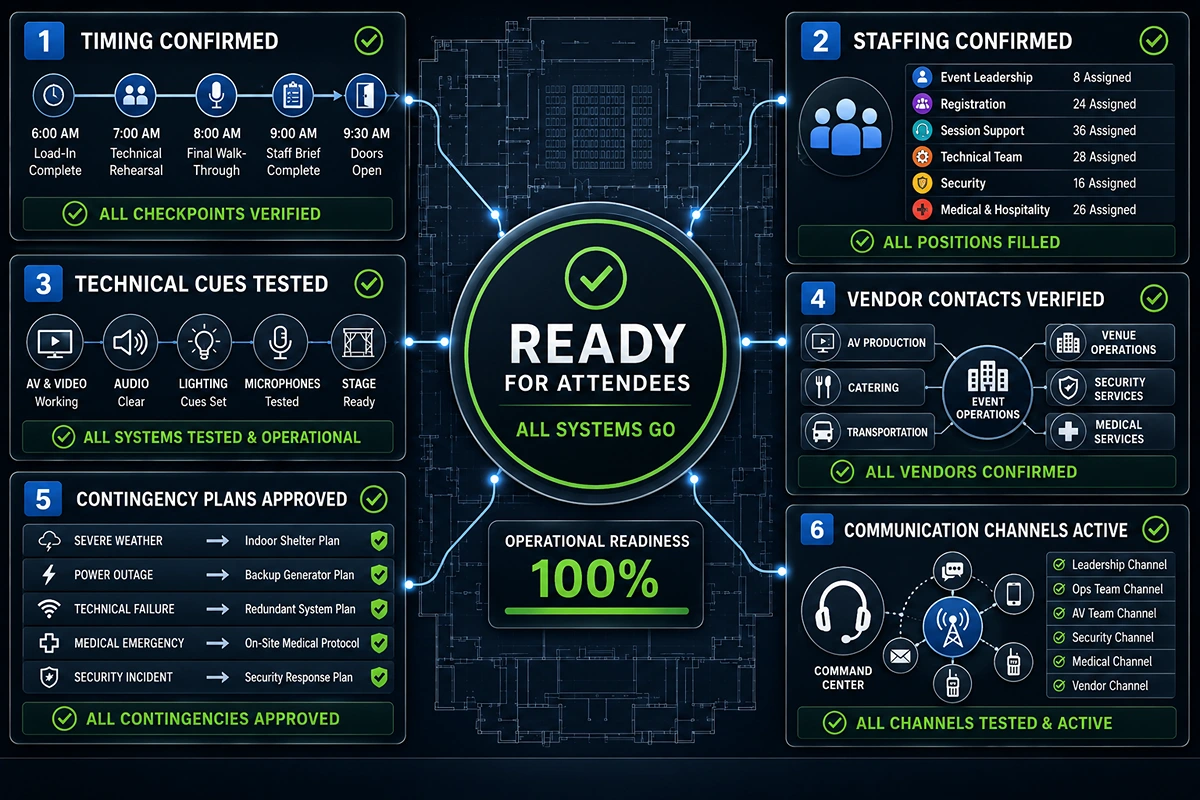
The Final Run of Show Checklist Before Doors Open
Walk through this before event day:
- Timing confirmed. Every activity has a start time, an end time, and an owner's name.
- Staffing confirmed. Every person on the team has read their section and knows their role.
- Technical cues tested. The AV operator has tested every video, screen, and audio transition.
- Vendor contacts verified. Catering, security, and rentals have confirmed arrival times and setup locations.
- Contingency plans approved. The team has reviewed the "what if" scenarios and agreed on responses.
- Communication channels are active. Headsets charged, walkie-talkies tested, Slack group created.
Fast Takeaway: If every stakeholder can answer "What happens next?" at any moment during the event, your run of show is ready.
Plan Your Next Event Without Timing Failures
A run of show should do more than outline your event; it should control it.
If you're planning a large-scale event, having the right structure, staffing alignment, and real-time coordination can make the difference between a smooth execution and a breakdown.
👉 Get a customized run-of-show template or expert support to ensure your event runs flawlessly from start to finish.
Ready to elevate your next event?
Join thousands of event planners who trust EventStaff.com for reliable, professional staffing solutions.
Trusted by event professionals nationwide
1k+
Events Staffed
2 million+
Guests Served
97%
Positive reviews