
Executive Summary
Creating an event floor plan template is about defining which zones your event needs (registration, dining, VIP, exits), mapping exactly where staff should position themselves in each zone, and knowing what layout mistakes break guest flow. The framework hinges on three things: identifying zones based on your event type, placing staff strategically to manage traffic and transitions, and spotting common design errors before the event starts. By the end, you'll have a clear event venue layout guide that keeps guests moving, staff confident, and you stress-free on the day.
How do you create an event floor plan template that actually works on the day of your event?

Most event planners don’t struggle with ideas they struggle with execution. The difference between a smooth event and last-minute chaos often comes down to one thing: a clear, functional event floor plan template.
An effective event floor plan template doesn’t just map your venue it defines guest flow, eliminates bottlenecks, and positions staff where problems happen before they escalate.
In this guide, you’ll learn how to build an event layout template that keeps guests moving, staff aligned, and your event running exactly as planned.
What Is an Event Floor Plan Template (And Why It Matters)?
An event floor plan template is not just a layout—it’s a flow management system.
It answers three critical operational questions:
- Where do guests enter and move first?
- Where will congestion naturally occur?
- Where should staff be positioned to prevent delays?
Without a defined event floor plan design, teams react to problems in real time. With one, they prevent them entirely.
In high-attendance events, even a 30-second delay at entry can cascade into 15–20 minutes of disruption across sessions, dining, and networking zones.
That’s why experienced planners treat the event venue layout guide as an execution tool—not a design document.
CEO Excerpt
Most event coordinators wing their floor plan and find bottlenecks only when 300 people are stuck at registration. The ones who win start with an event floor plan template, map staff positions to match guest flow, and test for problem zones before anyone arrives.-Daniel Muersing
Step 1: Map Your Core Zones (This Takes 10 Minutes)
Here's the exact move: Write down these five zones and assign them to physical spaces in your venue. Not all events need all five, but these are the ones that matter.
Registration zone (where guests enter and check in). Staff here manage flow and set the tone. Get this wrong, and your entire event starts with a 20-minute wait. Learn about common registration mistakes.
Main event space (conference room, ballroom, outdoor area, wherever the action happens). This is where your primary content or experience lives.
Dining zone (if you're serving food). This is where transitions kill you. Guests bottleneck here because eating is slower than standing.
Networking or breakout zones (smaller conversation areas or side rooms). People scatter here, which actually relieves pressure on the main space.
Exits (the door nobody thinks about until there's an emergency). Staff at exits keep lines orderly and prevent the "everybody rushing out at once" disaster.
That's it. Not complicated. Just clear zones with clear purposes. These five zones form the base of every event floor plan template you'll ever build.
Your Event Floor Plan Template
Here's the actual event floor plan template structure you need. Fill this in for your event. Use this exact structure, don't overcomplicate it.
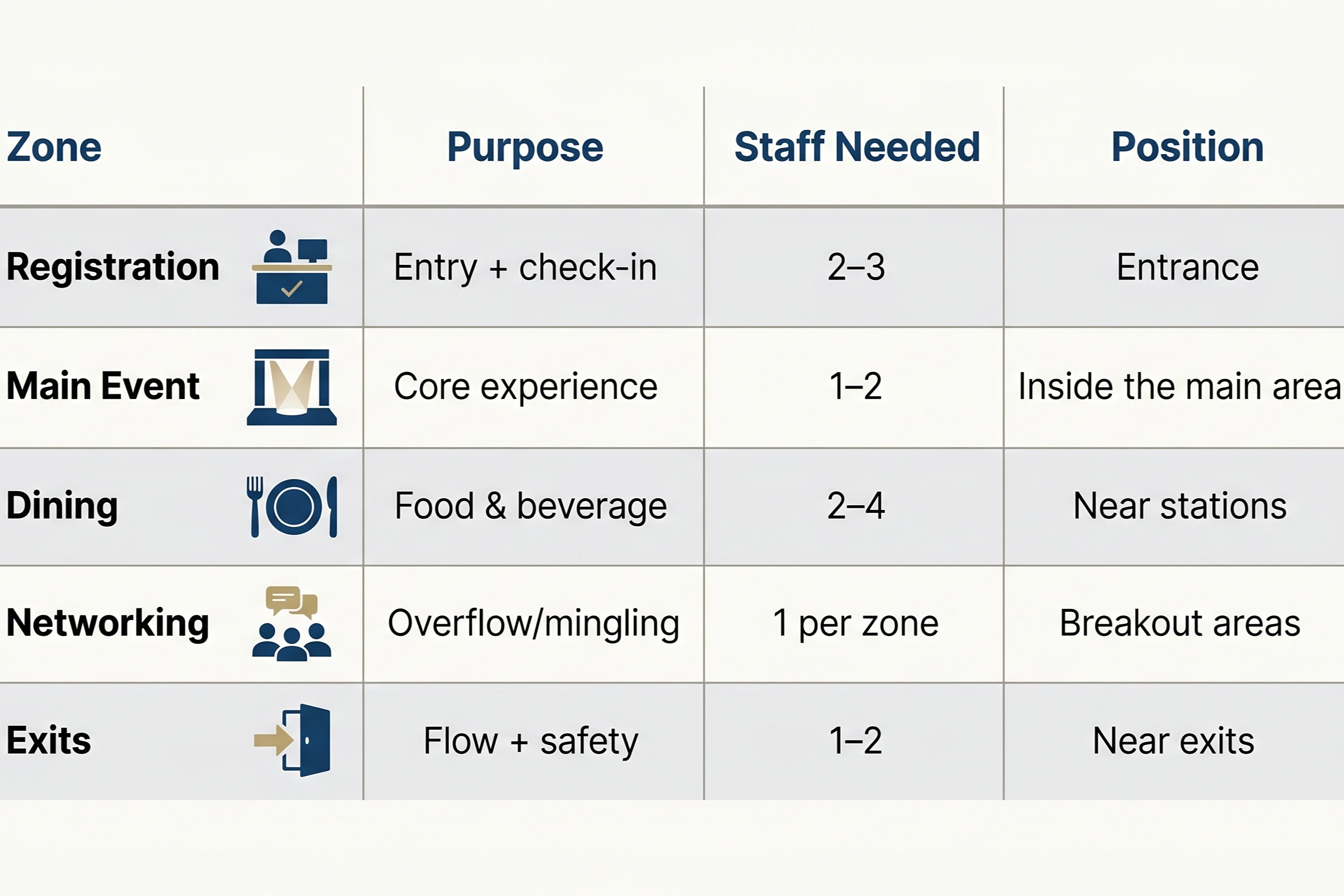
Fill this once, and you have a working event floor plan template. Print it. Share it with your team. If your event is larger, increase staff—not zones.
Step 2: Place Your Staff Where Problems Happen (The Actual HOW)
This is where most event floor plan templates either work or break.
This is where your event floor plan template comes into effect. For each zone, ask: "Where will guests get confused or bunch up?"
At registration, assign one person to check people in and another to direct them to the next step. You need both. One person trying to do both creates a wall of frustrated attendees.
At transitions (registration to main space, dining to sessions), place staff as "guides." Their job isn't to police, it's to point. A single staff member at a doorway saying, "main session is this way," cuts confusion by half.
At dining, position servers or assistants near the bar and food stations. People linger there. Staff presence keeps the flow moving without making it feel rushed.
At exits, one person manages orderly departure. Especially crucial if your event ends all at once (think conference floor plan templates with timed sessions).
This is what turns your event floor plan template from a layout into an execution plan.
Real example: A corporate gala with 200 people had no one at the coat check entrance. Guests wandered for five minutes looking for where to drop their coats. The event floor plan design would have put one staff member there. Tiny fix. Massive difference in perceived organization.
What Kills Most Event Floor Plan Templates (And How to Spot It Before the Event)
If your event floor plan template has any of these, avoid common mistakes before event day.
Single entrance for all traffic. This creates a parking lot. Use multiple entry paths if your venue layout allows.
Staff gaps at transitions. Between sessions, between dining and dancing, people get lost. This is where your event venue layout guide earns its keep.
VIP too close to general admission. Guests in the regular zone see premium guests getting treated differently and feel second-class. VIP needs visual separation.
No clear flow direction. If guests can't tell where to go next, they stall. Signage plus staff positioning fixes this.
Exits blocked or unclear. Fire codes exist for a reason. Make exits obvious and staffed.
Why Most Event Floor Plan Templates Fail
Most event floor plan templates fail for one reason: they look correct on paper but don't match real movement. If guests stop, hesitate, or bunch up, your layout isn't working. A good event floor plan template prevents confusion. A bad one creates it.
Understanding event flow psychology helps you anticipate where guests will naturally bottleneck and position staff accordingly.
Build Your Event Layout Template: The Checklist
- Get the venue floor plan
- Mark 5 zones
- Assign staff per zone (use the table above)
- Mark positions with an X
- Check for flow gaps
- Review with the venue
That's your event layout template ready. Print it. Share it with staff.
Real-World Scenario: How Floor Planning Impacts Guest Flow
At a 300-person corporate networking event, registration was placed directly at the entrance without a transition buffer.
Result:
- Guests formed a queue extending outside the venue
- Late arrivals disrupted opening remarks
- Staff had no space to redirect flow
Fix (applied in future event):
- Added a pre-registration holding zone
- Assigned 2 staff for direction + 2 for check-in
- Created separate entry and exit paths
Outcome:
- Check-in time reduced by 40%
- No visible congestion
- Improved first impression scores from attendees
This is the difference between a basic layout and a strategic event floor plan template.
Need a Floor Plan That Actually Works on Event Day?
A well-designed event floor plan template is only as effective as the team executing it.
At EventStaff, we don’t just provide staff we deploy trained professionals who understand guest flow, manage transitions in real time, and execute your event layout template without constant supervision.
Whether you already have a layout or need help building one from scratch, we ensure your event runs smoothly from entry to exit. Speak with our team today and turn your event floor plan into a flawless on-ground execution.
Ready to elevate your next event?
Join thousands of event planners who trust EventStaff.com for reliable, professional staffing solutions.
Trusted by event professionals nationwide
1k+
Events Staffed
2 million+
Guests Served
97%
Positive reviews